
 HERMESS
Installation#
Prerequisites#
Python 3.10 or later.
A C compiler is optional. When
gccis on thePATHthe CasADi integrator is JIT-compiled, which speeds up long runs; without it the simulator falls back to the interpreted integrator automatically.
Install from PyPI#
pip install hermess
With the optional desktop GUI (PySide6, pyqtgraph; see Graphical interface):
pip install "hermess[gui]"
The dependencies (CasADi, NumPy, SciPy, pandas, matplotlib, pydantic, tabulate,
tqdm) are installed with the package, and the shipped example systems come with
the wheel, so hermess.simulate("3bus_loadstep", T_end=5.0) works right away.
Install from source#
For development, clone the repository and install the package in editable mode:
git clone https://github.com/maitrayadesai/hermess
cd hermess
python -m venv venv
source venv/bin/activate        # Windows: venv\Scripts\activate
pip install -e .
The dependencies (CasADi, NumPy, SciPy, pandas, matplotlib, pydantic, tabulate,
tqdm) are declared in pyproject.toml and are installed with the package.
To also install the optional desktop GUI (PySide6, pyqtgraph; see Graphical interface):
pip install -e ".[gui]"
With uv#
If you use uv, the pinned environment in
uv.lock is reproduced with:
uv sync
uv run hermess list
With conda#
conda env create -f environment.yaml
conda activate hermess
A requirements.txt with fully pinned versions is also provided, exported from
uv.lock, for environments that need an exact reproduction of the tested
dependency set.
Verifying the installation#
Run the demonstration scenario:
hermess run ieee39_conv --small-signal
If the hermess command is not found (typical on Windows when pip warns
that the scripts directory is not on PATH, e.g. after a user-site
install), python -m hermess is the same program; installing into a
virtual environment avoids the problem entirely.
This simulates ten seconds of the IEEE 39-bus converter system
(ieee39_conv) with dynamic line models and a small-signal analysis at
the operating point, so expect a runtime of a few minutes, and plots the bus
voltages and the internal states. If the two figures below appear, the
installation works. hermess list and hermess --version are quicker
smoke tests.
Alternatively, from Python:
import hermess

hermess.list_systems()                       # the systems that ship with the package
dae = hermess.simulate("3bus", T_end=5.0)   # run one and get the finished model back
print(dae.x_full.shape)
The test suite is another check, and needs pytest:
pip install pytest
pytest -q
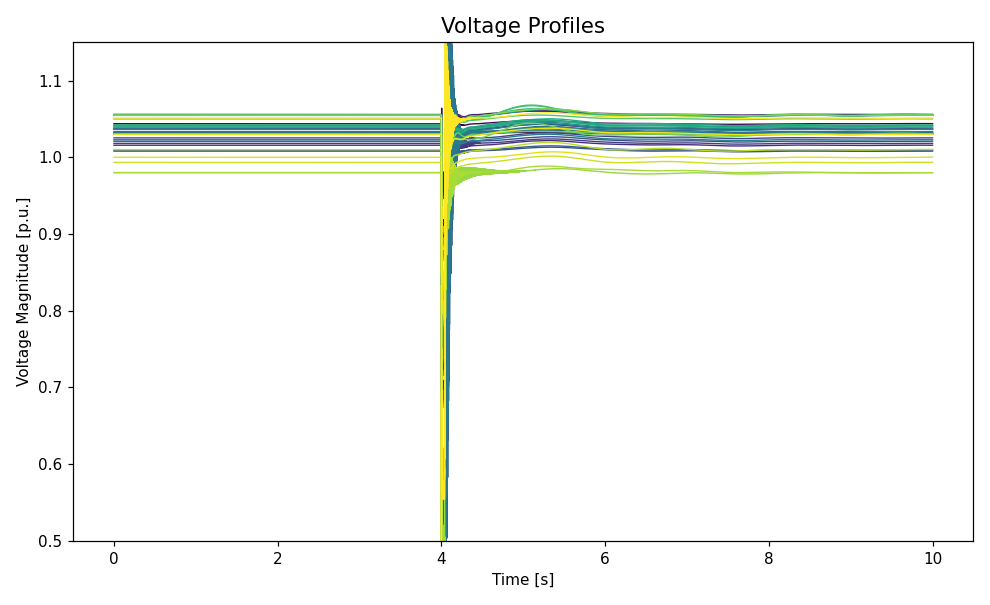
Figure 1: Simulated bus voltage magnitudes of the shipped IEEE 39-bus converter scenario.#
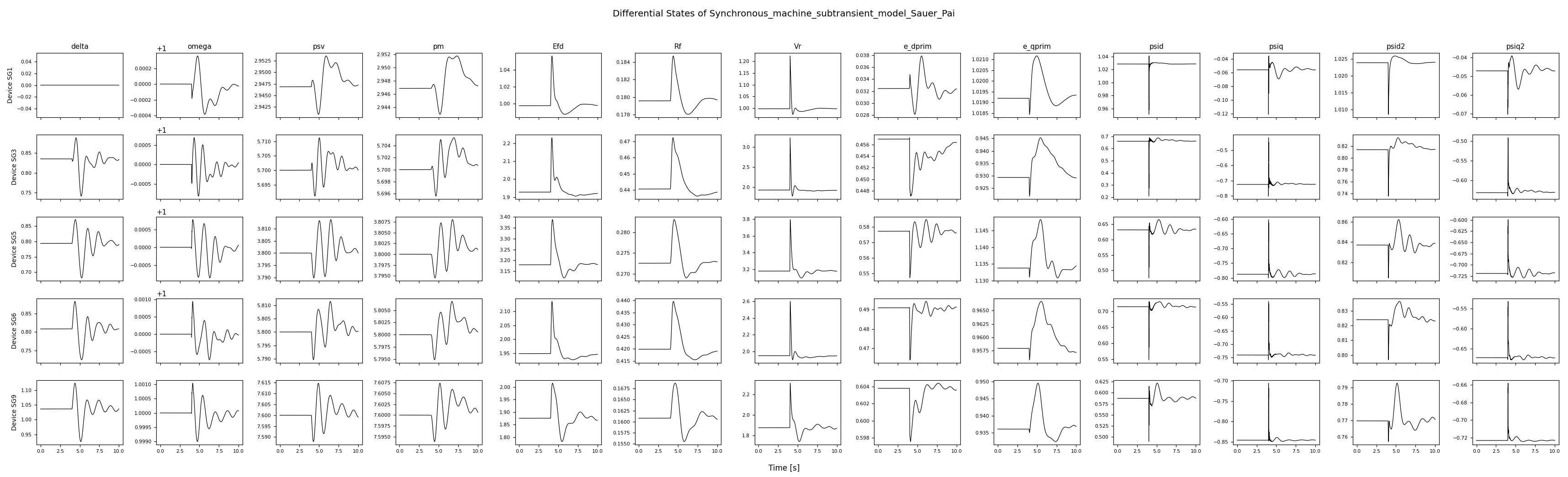
Figure 2: Simulated differential states of the synchronous machines in the same run (one row per machine, one column per state).#
Troubleshooting#
The plots do not appear. The interactive backend is only selected when a run asks for figures. In a headless environment (a server, CI) set
MPLBACKEND=Aggand useplot=False, then plot from the returned object.A run fails during initialization. The power flow has to converge before the time-domain simulation starts. Check the
BusInitentries of the system file, in particular that exactly one bus is declaredslack.Dependency conflicts. Install into a clean virtual environment rather than the system Python.